Graphs and qPCR analysis, shaped by researchers’ requests.
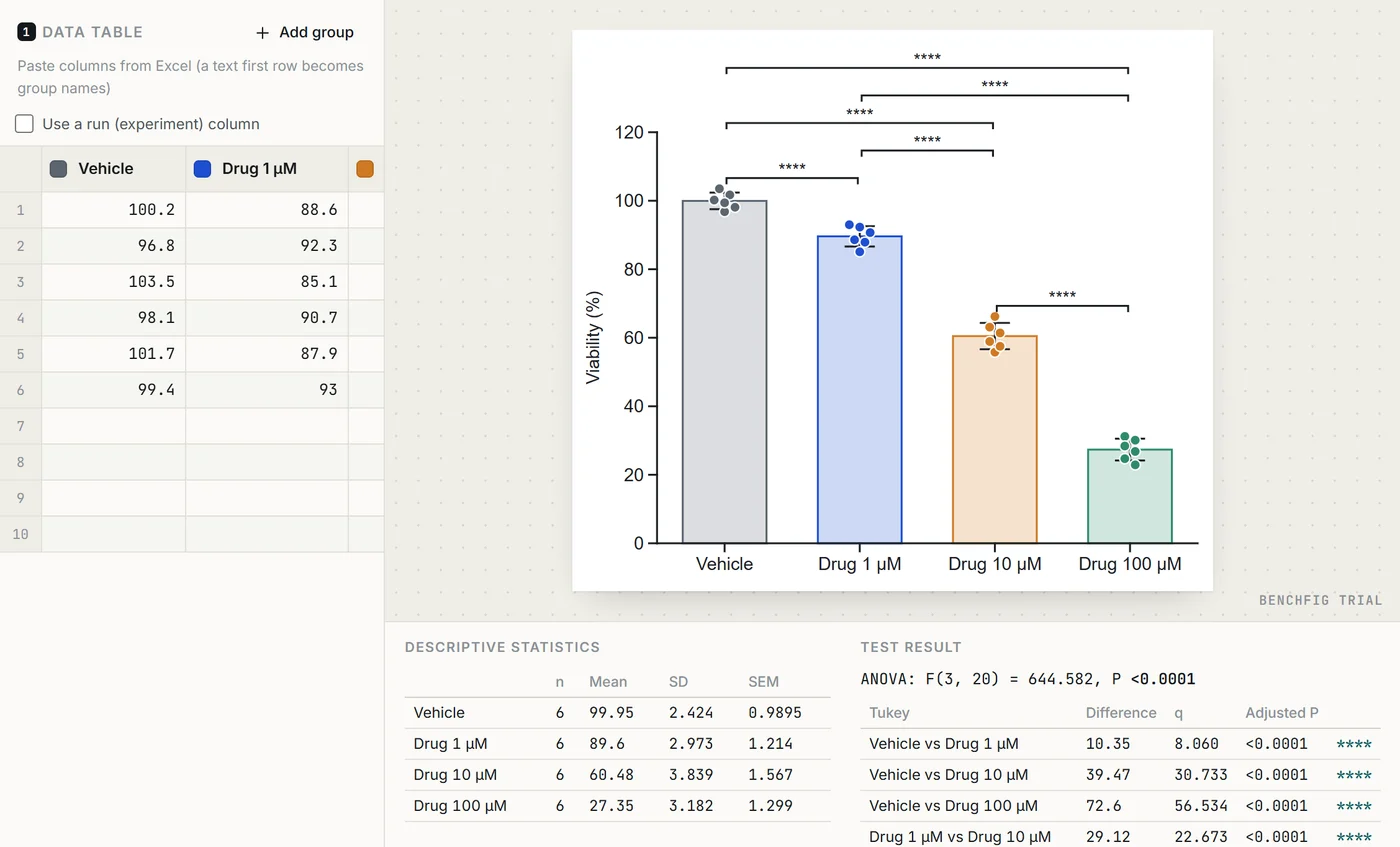
Paper-ready graphs and qPCR analysis: bar charts with individual points, t tests, one-way ANOVA with Tukey’s or Dunnett’s test, nonparametric tests, and standard-curve / ΔΔCt analysis straight from CFX result files. New features are added based on what researchers ask for. Offline, in English or Japanese.
Free download. Runs in trial mode (sample data) until you enter a license code.
Updated in response to researchers’ requests (latest update: October 27, 2026) Update history →
- Updated from researchers’ requests
- Your data never leaves your PC
- Works offline after activation
- English & Japanese
Pricing
All plans have the same features. They differ in the number of PCs and how long you receive updates.
Personal annual
- Every update, right away
- Renews automatically each year; cancel anytime
- Up to 2 PCs at a time (e.g. lab and home)
Lab annual
- Up to 5 PCs at a time for your lab (swap PCs freely)
- Quote, invoice and license certificate (pay by invoice)
- Your requests get priority consideration
- Every update, right away
Perpetual
- Keep using every version released within 1 year of purchase, forever
- Later versions pause saving and export (earlier versions keep working)
- Up to 2 PCs at a time
Pay by credit card (Stripe). Your license code appears on screen and arrives by email right after payment.
US$ amounts are approximate, at about ¥159 = US$1 (November 2026). You are charged in Japanese yen; the final amount depends on your card issuer’s rate.
Already purchased?DownloadWhere to enter the codeSend my code againManage subscription
All prices include tax. Annual plans renew automatically every year; we email you 30 days before renewal. Cancel anytime under “Manage subscription” below (it stops at the next renewal; you can use it until then). Refunds: first purchases and annual renewals alike, in full for any reason within 14 days of the payment (or renewal) date (see the refund policy).
If you bought the ¥2,980 one-time license: it is no longer sold, and your license keeps receiving all future updates free of charge, as promised in the terms.
For customers
If you bought in this browser, your code is also shown in the pricing section above. On another PC or browser, use “Send my code again”.
Download
If Edge stops it: … → Keep → Show more → Keep anyway
Install
If “Windows protected your PC” appears: More info → Run anyway
Activate
Click Trial mode | Enter code on the right of the app’s top bar, paste the code and click Activate
For universities and institutes
We provide the paperwork needed to buy with research funds. The lab annual plan (¥19,800/year, approx. US$125; up to 5 PCs at a time) can be paid by invoice (bank transfer, after delivery).
How it works
- Ask for a quote by emailSend the addressee (institution and lab), the plan and the documents you need to [email protected].
- We send a quoteUsually within 3 business days, as a PDF by email.
- Place the orderBy email or with your institution’s purchase order.
- License and invoiceUsually within 3 business days after we confirm the order, we send the license code, license certificate and invoice.
- Pay by bank transferBy the due date on the invoice.
- Bank transfer fees are borne by the customer.
- When buying with research funds (such as grants), please follow your institution’s rules. Ask your administration office whether an annual software license can be bought with the funds and which documents are needed.
- We are not a registered issuer of qualified invoices under Japan’s invoice system (no registration number). We can issue invoices with the items of a “kubun kisai” invoice (date, description, amount, addressee, etc.) and receipts made out to your institution. Prices are in Japanese yen.
What it does
Click a heading to open it.
Graphs
Bars (mean) with every data point, box plots, dots with median and IQR, or dots with mean ± error. Log-scale y axis. SD, SEM or 95% CI error bars. Significance brackets and asterisks placed without overlap. Tune colors, axes, fonts and size (cm); export PNG (300 / 600 dpi) or SVG.
Statistics
Student’s, Welch’s and paired t tests, one-way ANOVA with Tukey (all pairs) or Dunnett (vs control) multiple comparisons (unequal n supported). Nonparametric tests for non-normal data: Mann–Whitney, Wilcoxon, Kruskal–Wallis with Dunn’s test and Friedman. Repeated-measures ANOVA with values matched by row (Mauchly’s sphericity test, Greenhouse–Geisser correction). Two-way ANOVA (Type III, interaction, Šidák or Tukey multiple comparisons). Normality (Shapiro–Wilk) and equal-variance (Brown–Forsythe) checks, effect sizes (Cohen’s d, η²), a results line such as “t(14) = 7.42, P < 0.0001, d = 3.71” and a methods sentence are written for you. Verified against Python’s SciPy.
qPCR
Reads Bio-Rad CFX “Quantification Cq Results” (CSV / Excel) as is. Standard curves (slope, R², efficiency), ΔΔCt with optional Pfaffl correction, replicate outlier flags — then straight to a graph.
Survival, correlation & regression
Kaplan–Meier curves with censor ticks and confidence bands, log-rank test (and Gehan–Breslow–Wilcoxon), median survival with 95% CI and hazard ratio. Scatter plots with regression line and confidence / prediction bands, Pearson (95% CI) and Spearman correlation, slope and intercept with SE and 95% CI, R². Verified against SciPy and statsmodels.
Repeated runs
Load the files from repeated experiments at once — sample and gene names are matched automatically. ΔΔCt is calculated within each run and statistics use the run means (n = runs; paired tests available). SuperPlots color every point by run, with no pseudoreplication.
Export to journal specs
Pick Nature, Cell Press, PLOS ONE, eLife and more: width, text size, line weight and resolution are set for you, with a checklist of what meets the guidelines. PDF keeps text editable with embedded fonts (no outlines); TIFF is LZW-compressed with dpi. PNG and SVG too.
Figure layout
Place graphs, qPCR results and SuperPlots as panels A, B, C on one page. Panels are redrawn at their final size, so text stays at the required point size. Columns, gaps and label style follow the journal. Saved in your project for later edits.
qPCR in three steps
- Open the fileCSV / Excel exported from CFX. Column-name variants and “Undetermined” are handled.
- Check the setupReference gene, control group and sample groups are guessed for you. Review flagged wells.
- Make the graphRelative expression by group, with ANOVA + Tukey results as asterisks.
BenchFig is made by a working researcher who uses qPCR every day, starting from problems in their own experiments (ΔΔCt calculations, placing significance brackets and asterisks, fitting figures to journal rules). Requests are read by a fellow researcher and decide what comes next.
How it differs
Shown next to GraphPad Prism, a widely used full-featured package. BenchFig Pro does less, but keeps the price low and adds what researchers ask for.
| BenchFig Pro | GraphPad Prism (reference) | |
|---|---|---|
| Payment | Annual (auto-renew, cancel anytime) or perpetual | Annual or monthly subscription, or perpetual (Prism 11; GraphPad recommends the subscription) |
| Price | Personal ¥3,980/yr (approx. US$25) · Lab ¥19,800/yr · Perpetual ¥9,800 | Personal from US$265/yr (academic Standard; checked on GraphPad’s How to Buy page on 2026-11-10)* |
| Interface language | English, Japanese | English |
| Graph types | Focused on group comparisons (bar + dots, box plots), survival curves and scatter plots with linear regression | Very many (nonlinear regression, Cox regression…) |
| qPCR | Analyzes CFX result files directly | Enter analyzed values to plot |
| OS | Windows (Mac under consideration) | Windows, Mac |
* Based on public information as of November 10, 2026 (GraphPad Prism prices checked on GraphPad’s How to Buy page that day). Check each vendor’s website for current prices and features. GraphPad Prism is a trademark of GraphPad Software, LLC. BenchFig is not affiliated with GraphPad Software.
If Windows shows a warning
BenchFig Pro is not yet code-signed, so Windows may ask for confirmation the first time. The app contains no ads and never sends your data (it only goes online to activate, to check renewals, and when you press Send in “Send a request”).
- Edge: “isn’t commonly downloaded”In the downloads list, click “…” on that line → “Keep”, then “Show more” → “Keep anyway” (Chrome saves it right away).
- “Windows protected your PC”Click “More info”.
- Publisher shows “Unknown publisher”Check that the file is “BenchFig-Pro-Setup.exe”, then click “Run anyway”.
- Installation startsAfterwards, start it from the Start menu as usual.
Only download with the button on this page (our official GitHub release page). You can verify the file with the SHA-256 hash on the release page. If your organization blocks unsigned apps, please ask your IT administrator.
Purchase
Before buying, please try the browser trial to make sure it fits your data.
| Price | Personal annual ¥3,980/year (approx. US$25), Lab annual ¥19,800/year (approx. US$125), Perpetual ¥9,800 (approx. US$62); tax included. Charged in Japanese yen; US$ amounts are approximate (about ¥159 = US$1, November 2026). |
|---|---|
| Term | Annual plans run for 1 year and renew automatically at the same price. We email you 30 days before renewal. |
| Cancellation | Anytime from “Manage subscription” (Stripe customer portal). Cancel before the renewal date and you will not be charged again; you can use the app until the end of the current period. |
| Payment | Credit card (processed by Stripe). The lab plan can also be paid by invoice (bank transfer, after delivery); see “For universities and institutes” on this page. |
| Delivery | Your license code is shown right after payment and also emailed to your purchase address. Download the app from this page. Lost your code? Use “Send my code again”. |
| PCs | Personal annual and perpetual: up to 2 of your own PCs at a time. Lab annual: up to 5 PCs at a time. When you replace a PC, deactivate the old one and move the license. |
| Lab plan extras | Swap PCs within the lab freely (deactivate a PC you no longer use and activate another). We issue a quote, invoice and license certificate. Requests from lab customers get priority consideration. |
| If it expires | If an annual license expires you can still open, view and edit your files. Only saving and export pause, and they come back when you renew. |
| Requirements | Windows 10 / 11 (64-bit). Internet is needed only for activation and for checking annual renewals. |
| Refunds | First purchases (perpetual and annual alike) and annual renewals: full refund for any reason within 14 days of the payment (or renewal) date. After a refund, the license code can no longer be used. |
| Qualified invoices (Japan) | We are not a registered issuer of qualified invoices under Japan’s invoice system (no registration number). We can issue invoices with the items of a “kubun kisai” invoice (date, description, amount, addressee, etc.) and receipts made out to your institution. |
If your perpetual update period has ended, reinstall an earlier version from past releases to keep saving and exporting forever. Past releases
FAQ
What is the difference from the trial?
The trial runs in your browser. Besides the sample data, you can paste your own numbers or open your own files (CFX results, CSV, Excel) and see the tables, results and graphs (files are read only inside your browser and never sent anywhere). On the graph screen, a PNG (2x screen size) is free to save. Saving projects (.benchfig), publication exports (PDF / TIFF / high-resolution PNG / SVG / CSV and journal presets) and copying come with a paid license (annual or perpetual).
Annual or perpetual?
The features are the same. The annual plan gets every update for as long as you subscribe (renews each year). The perpetual license is a single payment and lets you keep using every version released within 1 year of purchase. Versions released later pause saving and export, so keep using an earlier version or switch to the annual plan.
How do I cancel?
Anytime from “Manage subscription / payment” on this page (Stripe customer portal), using your purchase email address. Billing stops at the next renewal and you can use the app until then.
What happens to my files if an annual license expires?
You can still open, view and edit them. Only saving and export pause, and they come back as soon as you renew.
How many PCs?
Personal annual and perpetual: up to 2 of your own PCs at a time (e.g. lab and home). Lab annual: up to 5 PCs at a time. Activate once online; after that it works offline. When you replace a PC, use “Deactivate this PC” on the old one and activate the new one.
Can my lab use it? Can we pay by invoice?
The lab annual plan (¥19,800/year) can be active on up to 5 lab PCs at a time, and you can swap PCs freely (deactivate one you no longer use). We issue quotes, invoices (bank transfer, paid after delivery), a license certificate and receipts made out to your institution. See “For universities and institutes” on this page, or email [email protected].
Can you issue a qualified invoice (Japan)?
We are not a registered issuer of qualified invoices (no registration number). We can issue invoices with the items of a “kubun kisai” invoice (date, description, amount, addressee, etc.) and receipts made out to your institution.
PCs without internet?
If activation cannot reach the server, the app works provisionally for 14 days. For PCs that never go online, email us the request code shown in the app and we will activate it manually (annual plans are re-activated each year).
Refunds?
Yes. First purchases (perpetual and annual alike) and annual renewals are refunded in full for any reason within 14 days of the payment (or renewal) date, for example if it did not suit you or you did not notice the renewal. After a refund, the license code can no longer be used. See the refund policy.
I bought it for ¥2,980. What happens?
Nothing changes. Licenses bought at ¥2,980 keep receiving all future updates, including new features, free of charge.
Mac?
Windows only for now. A Mac version is under consideration. A browser version that also works on a Mac is in preparation; you can ask to be notified from the screen that appears when you press save or export in the trial (your email is used only for that notice).